

Get your wardrobe favorites delivered free with Prime
- Fast, free delivery on millions of items
- Prime Video, Amazon Music and more included
- Member-only deals all year
Key Takeaways
- Single-needle home machines like the Brother SE2000 excel at color blending but require frequent thread changes, whereas multi-needle options like the Smartstitch S-1001 automate color swaps for faster production.
- Hoop size is the primary limitation for growth; the Poolin EOC07 offers a massive 15-inch field for large designs, but requires more physical space and advanced stabilizer knowledge than compact models.
- Combo machines (sewing and embroidery) like the Brother SE700 save space but often have smaller embroidery fields and slower stitching speeds compared to dedicated embroidery-only units like the Brother PE900.
- Commercial-grade units such as the Smartstitch S-1201 Plus provide industrial speed and durability but lack the user-friendly interfaces and built-in designs found in consumer models, creating a steep learning curve.
- Accessories matter: bundles with the Brother PE900 that include multiple hoops and stabilizers save significant upfront costs, while bare-bones options require separate purchases for essential items like tear-away stabilizer.
| Poolin EOC06 Large-Hoop Embroidery Machine with 11 × 7.9-Inch Embroidery Area |  | Best for Large-Hoop Projects | Maximum embroidery area: 11 × 7.9 inches | Included hoops: Two 5.5 × 5.5-inch; one 7.9 × 7.9-inch; one 7.9 × 11-inch | Touchscreen: 7-inch color LCD | VIEW LATEST PRICE | See Our Full Breakdown |
| Brother SE1900 Computerized Sewing and Embroidery Machine |  | Best for Sewing-and-Embroidery Versatility | Built-in sewing stitches: 240 | Embroidery designs: 138 | Embroidery fonts: 11 | VIEW LATEST PRICE | See Our Full Breakdown |
| Brother SE2000 Computerized Sewing and Embroidery Machine |  | Best Connected Combo Machine | Sewing stitches: 241 | Built-in embroidery designs: 193 | Downloadable embroidery designs: 50 | VIEW LATEST PRICE | See Our Full Breakdown |
| Brother PE900 5″ x 7″ Embroidery Machine Bundle with Hoops, Thread, and Accessories |  | Best Embroidery-Only Bundle | Machine type: Embroidery-only | Embroidery area: 5 × 7 inches | Embroidery speed: Up to 650 stitches per minute | VIEW LATEST PRICE | See Our Full Breakdown |
| Brother SE700 Combo Sewing and Embroidery Machine with Hoops, Thread Set, and Accessories |  | Best Compact Combo for Small Embroidery | Machine type: Combo sewing and embroidery | Embroidery area: 4 × 4 inches | Built-in embroidery designs: 135 | VIEW LATEST PRICE | See Our Full Breakdown |
| Brother PE900 Large Embroidery Machine Bundle with Thread, Needles, Bobbins, and Stabilizer |  | Best Home Bundle for Designers | Embroidery Area: 5 x 7 inches | Built-in Designs: 193 | Connectivity: Wireless LAN | VIEW LATEST PRICE | See Our Full Breakdown |
| Poolin EOM 15-Needle Embroidery Machine Starter Bundle |  | Best for Small Business Hats | Needles: 15 | Screen Size: 9 inches | Connectivity: WiFi, USB | VIEW LATEST PRICE | See Our Full Breakdown |
| Janome Memory Craft 500E LE Embroidery Machine |  | Best Large-Field Home Machine | Embroidery Area: 7.9 × 11 inches | Built-in Designs: 160 | Fonts: 6 Monogramming | VIEW LATEST PRICE | See Our Full Breakdown |
| Smartstitch S-1201 Plus 12-Needle Commercial Embroidery Machine | 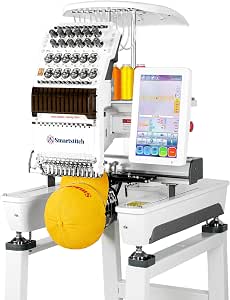 | Best for High-Volume Production | Needles: 12 | Embroidery Area: 12 × 16 inches | Max Speed: 1200 spm | VIEW LATEST PRICE | See Our Full Breakdown |
| Brother SE700 Sewing and Embroidery Machine |  | Best Dual-Function Starter | Embroidery Field: 4 × 4 inches | Built-in Designs: 135 | Sewing Stitches: 103 | VIEW LATEST PRICE | See Our Full Breakdown |
| Smartstitch S-1001 Commercial Embroidery Machine |  | Best for Small Business Growth | Needles: 10 | Max Speed: 1200 SPM | Embroidery Area: 9.5″ x 14.2″ | VIEW LATEST PRICE | See Our Full Breakdown |
| Brother PE900 Embroidery Machine with Ultimate Embroidery Kit |  | Best All-Around Home Machine | Embroidery Field: 5″ x 7″ | Built-in Designs: 193 | Display: 3.7″ color LCD touchscreen | VIEW LATEST PRICE | See Our Full Breakdown |
| Brother PE545 Embroidery Machine Bundle with 4 Hoops, 40 Thread Spools, and Accessories |  | Best for Beginners on a Budget | Max Embroidery Area: 4″ x 4″ | Built-in Designs: 135 | Display: 3.7-inch LCD Touch Screen | VIEW LATEST PRICE | See Our Full Breakdown |
| Brother NQ1700E Embroidery Machine with 6 x 10-Inch Embroidery Field |  | Best for Large Design Projects | Embroidery Field: 6 x 10 inches | Built-in Designs: 258 | Display: 4.85-inch full-color LCD | VIEW LATEST PRICE | See Our Full Breakdown |
| Poolin EOC07 Computerized Embroidery Machine with 7.9 × 15-Inch Embroidery Area |  | Best Value for Wide-Format Embroidery | Max Embroidery Area: 7.9 × 15 inches | Built-in Designs: 200 patterns | Display: 7-inch color touchscreen | VIEW LATEST PRICE | See Our Full Breakdown |
| embroidery machine | Connectivity | Display | Built-in designs |
|---|---|---|---|
| Poolin EOC06 Large-Hoop Embroi | — | — | 200 patterns |
| Brother SE1900 Computerized Se | Built-in USB port | 3.2-inch color LCD touchscreen | — |
| Brother SE2000 Computerized Se | Wireless LAN and USB | 3.7-inch color touchscreen | — |
| Brother PE900 5" x 7" Embroide | Artspira wireless app | 3.7-inch LCD touchscreen | — |
| Brother SE700 Combo Sewing and | Wireless LAN | 3.2 × 1.8-inch color touchscreen | — |
| Brother PE900 Large Embroidery | Wireless LAN | 3.7-inch LCD Touch Screen | 193 |
| Poolin EOM 15-Needle Embroider | WiFi, USB | — | — |
| Janome Memory Craft 500E LE Em | — | Full-color LCD Touchscreen | 160 |
| Smartstitch S-1201 Plus 12-Nee | Wi-Fi, USB | — | — |
| Brother SE700 Sewing and Embro | Wireless LAN, USB | 3.7-inch Touchscreen | 135 |
| Smartstitch S-1001 Commercial | USB, WiFi | — | — |
| Brother PE900 Embroidery Machi | Wireless LAN, USB | 3.7" color LCD touchscreen | 193 |
| Brother PE545 Embroidery Machi | Wireless LAN, USB | 3.7-inch LCD Touch Screen | 135 |
| Brother NQ1700E Embroidery Mac | Wireless | 4.85-inch full-color LCD | 258 |
| Poolin EOC07 Computerized Embr | Wi-Fi and USB | 7-inch color touchscreen | 200 patterns |
More Details on Our Top Picks
Poolin EOC06 Large-Hoop Embroidery Machine with 11 × 7.9-Inch Embroidery Area
The Poolin EOC06 is the strongest fit here for buyers who want to stitch larger designs without repeated hoop changes. Its 11 × 7.9-inch embroidery area and four included hoops give it more room than the 5 × 7-inch Brother SE2000 and SE1900, which makes it better suited to larger panels and expansive motifs. A 7-inch color touchscreen, 200 built-in designs, and included digitizing software give newcomers several ways to get started, while USB and wireless LAN provide flexible file transfer. Automatic trimming, needle threading, and bobbin winding also reduce routine setup work. The tradeoff is that this is embroidery-focused rather than a sewing-and-embroidery combo, and imported designs must be exported in DST or DSB format. Its supplied 90/14 needle is specified for common fabrics under 4 mm thick, so heavier materials may call for a different needle.
Pros:- 11 × 7.9-inch maximum embroidery area and four included hoops accommodate larger projects.
- 7-inch color touchscreen offers a roomy interface for selecting and editing designs.
- USB and wireless LAN provide two ways to transfer designs.
- Includes digitizing software, supplies, and automatic trimming, needle threading, and bobbin winding.
Cons:- Does not provide the general sewing functions found on the Brother SE2000 and SE1900.
- Imported design files must be exported in DST or DSB format.
- The included 90/14 needle is specified for common fabrics under 4 mm thick.
Best for: Embroidery-focused makers who want a larger working area, several hoop sizes, and both wireless and USB design transfer.
Not ideal for: People who need one machine for regular sewing and embroidery, or who want to use design files without checking their export format.
- Maximum embroidery area:11 × 7.9 inches
- Included hoops:Two 5.5 × 5.5-inch; one 7.9 × 7.9-inch; one 7.9 × 11-inch
- Touchscreen:7-inch color LCD
- Built-in designs:200 patterns
- Built-in fonts:8
- File transfer:USB flash drive and wireless LAN
- Included software:InStitch Doodle Digitizing Software
- Automatic features:Needle threading, bobbin winding, and thread trimming after each color
Our verdict“Choose the EOC06 if a larger embroidery field matters more than having sewing functions in the same machine.”
Brother SE1900 Computerized Sewing and Embroidery Machine
The Brother SE1900 makes the most sense for someone who wants a capable sewing machine alongside a useful embroidery setup. Its 240 sewing stitches, 138 embroidery designs, and 11 embroidery fonts cover both everyday construction and personalized projects, a broader mix of functions than the embroidery-only Brother PE900. The 5 × 7-inch field gives it more room than the Brother SE700’s 4 × 4-inch area, reducing the need to split up some larger designs. A color touchscreen supports design preview and editing, and USB lets owners import additional files. The main compromise is that the display is smaller than the Poolin EOC06’s 7-inch screen, and this model lacks the SE2000’s listed wireless LAN transfer and newer embroidery workflow features. It is also specified for 120-volt US use; the stated warranty is void if it is used or sold elsewhere.
Pros:- Combines 240 built-in sewing stitches with embroidery functions.
- 5 × 7-inch embroidery field offers more room than the Brother SE700’s 4 × 4-inch field.
- Color touchscreen supports design preview and editing.
- USB port allows importing embroidery design files.
Cons:- Smaller 3.2-inch display than the Poolin EOC06’s 7-inch touchscreen.
- Does not list wireless LAN transfer, unlike the Brother SE2000.
- Designed for 120-volt US use; other use or sale voids the warranty.
Best for: US-based sewists who want one machine for garment construction, home sewing, and embroidery on a 5 × 7-inch field.
Not ideal for: Embroidery-only buyers seeking a larger-than-5 × 7-inch field, or buyers outside the US who need a machine and warranty suited to their region.
- Built-in sewing stitches:240
- Embroidery designs:138
- Embroidery fonts:11
- Embroidery field:5 × 7 inches
- Display:3.2-inch color LCD touchscreen
- Buttonholes:10 auto-size styles
- Connectivity:Built-in USB port
- Voltage:120 V
Our verdict“Pick the SE1900 if you want a sewing-first combo machine with a larger embroidery field than the SE700 and do not need wireless transfer.”
Brother SE2000 Computerized Sewing and Embroidery Machine
For buyers who want sewing and embroidery with fewer file-transfer hassles, the Brother SE2000 is the most connected combo in this group. It pairs a 5 × 7-inch embroidery field with USB and wireless LAN, so designs can arrive by cable or network rather than relying on USB alone as on the Brother SE1900. Its 3.7-inch touchscreen supports resizing, rotation, repositioning, and combining designs; color sorting and jump-stitch trimming can also reduce manual cleanup between colors. The SE2000 lists 193 built-in designs and 13 fonts, more than the SE1900’s 138 designs and 11 fonts. It still cannot match the Poolin EOC06’s larger field, and buyers who need embroidery only may prefer the dedicated Brother PE900. This model is intended for 120-volt US use, and Artspira Thread Sets are sold separately.
Pros:- Combines 241 sewing stitches with embroidery functions.
- Wireless LAN and USB support flexible design transfer.
- Touchscreen editing includes resizing, rotating, repositioning, and combining designs.
- Color sorting and jump-stitch trimming can cut down on manual finishing.
Cons:- Its 5 × 7-inch field is smaller than the Poolin EOC06’s 11 × 7.9-inch area.
- The 3.7-inch display is smaller than the EOC06’s 7-inch touchscreen.
- Intended for 120-volt US use, and Artspira Thread Sets are sold separately.
Best for: US-based makers who want a sewing-and-embroidery combo with wireless design transfer and on-screen layout tools.
Not ideal for: Embroidery specialists who need a field larger than 5 × 7 inches, or buyers outside the US seeking region-compatible voltage and warranty coverage.
- Sewing stitches:241
- Built-in embroidery designs:193
- Downloadable embroidery designs:50
- Embroidery fonts:13
- Embroidery field:5 × 7 inches
- Display:3.7-inch color touchscreen
- Connectivity:Wireless LAN and USB
- Voltage:120 V
Our verdict“Choose the SE2000 for a versatile sewing-and-embroidery machine where wireless transfer and editing tools matter more than a large embroidery field.”
Brother PE900 5″ x 7″ Embroidery Machine Bundle with Hoops, Thread, and Accessories
The Brother PE900 bundle is a better match than the Brother SE2000 for buyers who already have a sewing machine and want a dedicated embroidery unit with supplies ready to hand. Its 5 × 7-inch field supports larger work than the SE700’s 4 × 4-inch area, while the 3.7-inch touchscreen and Artspira wireless transfer support design editing and delivery without making USB the only route. The bundle adds five hoops, 40 thread spools, design cards, and a wide selection of accessories, which gives new embroidery owners a broad starting kit. Unlike the Poolin EOC06, though, it cannot stitch an 11 × 7.9-inch design in one field, and it does not sew. The listing also gives two different built-in design counts—190 and 193—so buyers should treat that figure as uncertain.
Pros:- Dedicated embroidery machine avoids paying for sewing functions the buyer may not need.
- 5 × 7-inch field is larger than the Brother SE700’s 4 × 4-inch area.
- Wireless Artspira transfer and a 3.7-inch touchscreen support design handling.
- Bundle includes five hoops, 40 thread spools, design cards, and numerous accessories.
Cons:- Does not provide the sewing functions available on the Brother SE2000 and SE1900.
- Smaller maximum field than the Poolin EOC06.
- Bundle details and product description disagree on the built-in design count.
Best for: Embroidery-focused owners of a separate sewing machine who want a 5 × 7-inch Brother machine bundled with hoops, thread, and accessories.
Not ideal for: Buyers who need sewing functions, a field larger than 5 × 7 inches, or a clearly consistent built-in design count.
- Machine type:Embroidery-only
- Embroidery area:5 × 7 inches
- Embroidery speed:Up to 650 stitches per minute
- Display:3.7-inch LCD touchscreen
- Built-in design count:190 listed in bundle details; 193 stated in product description
- Built-in fonts:13
- Connectivity:Artspira wireless app
- Included hoops:Five: two 5 × 7-inch, one 1 × 2.5-inch, one 12 × 5-inch, and one 4 × 4-inch
- Included thread:40 polyester spools, 500 m each
Our verdict“Choose this PE900 bundle if you want a dedicated 5 × 7-inch embroidery machine with a substantial starter assortment and already own a sewing machine.”
Brother SE700 Combo Sewing and Embroidery Machine with Hoops, Thread Set, and Accessories
The Brother SE700 bundle is the compact choice for buyers who want sewing and embroidery in one machine but expect to make smaller designs. Its 4 × 4-inch embroidery area is the clearest limitation beside the Brother SE1900 and SE2000, both of which offer 5 × 7-inch fields; larger artwork on the SE700 may need to be resized or divided. In return, it combines 103 sewing stitches with 135 embroidery designs, 10 fonts, wireless LAN, and on-screen editing. The bundle’s four hoops and 40 thread spools add useful starting materials, while the color touchscreen helps with basic design adjustments. This is more versatile than the embroidery-only Brother PE900 for someone who also sews, but it is not the pick for larger garment panels or broad motifs. Design software may require separate downloads.
Pros:- Combines sewing and embroidery in one machine.
- Wireless LAN supports design transfer.
- Touchscreen provides on-screen design editing.
- Bundle includes four hoops, 40 thread spools, sewing feet, and other accessories.
Cons:- 4 × 4-inch field is smaller than the Brother SE1900 and SE2000’s 5 × 7-inch fields.
- Design transfer and creation software may require separate downloads.
- The listed 103 sewing stitches are fewer than the SE1900’s 240 and SE2000’s 241.
Best for: Beginning sewists and crafters who need one machine for everyday sewing and small personalized embroidery projects.
Not ideal for: Makers who regularly embroider designs larger than 4 × 4 inches or want a 5 × 7-inch field without resizing or splitting artwork.
- Machine type:Combo sewing and embroidery
- Embroidery area:4 × 4 inches
- Built-in embroidery designs:135
- Built-in embroidery fonts:10
- Built-in sewing stitches:103
- Buttonholes:10 one-step styles
- Display:3.2 × 1.8-inch color touchscreen
- Connectivity:Wireless LAN
- Included embroidery hoops:4
Our verdict“Pick the SE700 if a compact sewing-and-embroidery setup and included supplies matter more than a larger embroidery field.”
Brother PE900 Large Embroidery Machine Bundle with Thread, Needles, Bobbins, and Stabilizer
The Brother PE900 stands out because it removes the friction of sourcing supplies. Unlike the Brother SE700, which offers a smaller 4×4-inch field, this machine provides a 5×7-inch hoop suitable for monograms and medium-sized artwork. The inclusion of an 80-spool thread kit and pre-wound bobbins means you can start stitching immediately without shopping for consumables. However, this is strictly an embroidery-only device; if you need to sew garments, you must look elsewhere. The wireless LAN connectivity is a major convenience, allowing you to send designs from your computer without plugging in cables, a feature that streamlines the workflow significantly compared to older USB-only models.Pros:- Generous 5×7-inch embroidery field for larger projects
- Comprehensive bundle includes high-quality thread and stabilizers
- Wireless LAN allows cable-free design transfers
- Automatic needle threading reduces setup time
Cons:- Lacks sewing functions entirely
- Thread rack for the included spools is sold separately
- Limited to Brother-specific design formats
Best for: Home hobbyists who want a generous embroidery area and immediate access to essential supplies.
Not ideal for: Users who need a machine for both sewing and embroidery, as this unit cannot sew straight stitches.
- Embroidery Area:5 x 7 inches
- Built-in Designs:193
- Connectivity:Wireless LAN
- Display:3.7-inch LCD Touch Screen
- Included Thread:80 spools (500M each)
- Needles:100-piece 75/11 Organ
- Built-in Fonts:13
Our verdict“This bundle is the smartest choice for dedicated embroiderers who value convenience and ready-to-use supplies over multi-functionality.”
Poolin EOM 15-Needle Embroidery Machine Starter Bundle
For entrepreneurs focusing on caps and hats, the Poolin EOM offers commercial efficiency at a mid-range price point. Its 15-needle system with auto color change drastically reduces downtime compared to single-needle home machines like the Janome 500E LE. The 9-inch touchscreen provides a clear interface for managing complex, multi-color designs. The included 3D puff foam and tear-away stabilizer indicate a focus on textured, durable embroidery suitable for merchandise. While powerful, this machine demands a steep learning curve and significant workspace, making it overkill for casual hobbyists who only stitch occasionally.Pros:- 15 needles enable fast multi-color designs
- Optimized specifically for hat and cap frames
- Includes 3D puff foam for textured effects
- Auto trim and color change streamline production
Cons:- Large footprint requires dedicated workshop space
- Steep learning curve for new users
- Commercial maintenance needs exceed home models
Best for: Small business owners specializing in hat and cap embroidery who need high-volume output.
Not ideal for: Beginners or hobbyists with limited space, as this commercial-grade unit is bulky and complex.
- Needles:15
- Screen Size:9 inches
- Connectivity:WiFi, USB
- Thread Quantity:15 Colors (4000M each)
- Bobbins:144 pcs pre-wound
- Stabilizer:12″ x 25 Yards Tear Away
- Foam:3mm 3D Puff (10 Sheets)
Our verdict“This machine is a production workhorse for small businesses that prioritize speed and color variety on headwear.”
Janome Memory Craft 500E LE Embroidery Machine
The Janome Memory Craft 500E LE excels in design flexibility, offering a massive 7.9 × 11-inch embroidery area that dwarfs the 5×7-inch field of the Brother PE900. This extra space is ideal for large monograms or intricate patterns that require fewer hoop repositionings. The full-color touchscreen allows for direct on-screen editing, a feature that saves time by letting you adjust density and scale without external software. However, the lack of wireless connectivity means you are tethered to USB transfers, which can be less convenient than the WiFi options found on newer competitors. It is a premium choice for those who prioritize design size over connectivity.Pros:- Huge 7.9 × 11-inch embroidery field
- On-screen design editing capabilities
- Includes 30 exclusive large designs
- Adjustable speed for precision work
Cons:- No wireless connectivity (USB only)
- Heavy and bulky at 18.7 lbs
- Higher price point than entry-level models
Best for: Advanced home users who need the largest possible embroidery field for big projects.
Not ideal for: Users who prefer wireless design transfer or have limited desk space, as the machine is physically large.
- Embroidery Area:7.9 × 11 inches
- Built-in Designs:160
- Fonts:6 Monogramming
- Speed:400–860 spm
- Display:Full-color LCD Touchscreen
- Weight:18.7 lb
- Design Transfer:USB
Our verdict“Choose the 500E LE if your primary need is stitching large designs with minimal hoop repositioning.”
Smartstitch S-1201 Plus 12-Needle Commercial Embroidery Machine
The Smartstitch S-1201 Plus is built for throughput, featuring a 12 × 16-inch embroidery area and speeds up to 1200 stitches per minute. This capacity far exceeds the Poolin EOM, making it suitable for large banners, jackets, and broad apparel items. The aluminum construction and automatic thread trimming ensure durability and efficiency during long production runs. While it supports a wide variety of materials like leather and denim, the requirement to retain all packaging for returns is a notable inconvenience for buyers who want to test the machine thoroughly before committing. It is a serious investment for those scaling their embroidery business.Pros:- Massive 12 × 16-inch embroidery area
- High speed of 1200 stitches per minute
- Robust aluminum construction
- Handles diverse materials like leather and vinyl
Cons:- Must retain all packaging for potential returns
- Limited file format support (DST/DSB only)
- Requires significant technical setup
Best for: Established embroidery businesses needing high-speed, large-format production capabilities.
Not ideal for: Casual users or those with tight budgets, as this is a heavy-duty commercial unit.
- Needles:12
- Embroidery Area:12 × 16 inches
- Max Speed:1200 spm
- Touchscreen:10 inches
- Connectivity:Wi-Fi, USB
- File Formats:DST, DSB
- Stitch Memory:100 million stitches
Our verdict“This machine is engineered for professional shops that require speed, size, and material versatility.”
Brother SE700 Sewing and Embroidery Machine
The Brother SE700 offers a pragmatic solution for crafters who want both sewing and embroidery without buying two separate machines. Its 4 × 4-inch embroidery field is smaller than the Brother PE900, limiting it to small logos and monograms, but its 103 built-in sewing stitches make it versatile for garment construction. The Artspira app integration and wireless transfer simplify the learning process for beginners. However, the limited embroidery area means you cannot tackle large projects, and users needing heavy-duty commercial output will find the speed and capacity insufficient compared to multi-needle alternatives.Pros:- Combines sewing and embroidery functions
- Wireless transfer via Artspira app
- Compact and user-friendly interface
- Automatic needle threader
Cons:- Small 4 × 4-inch embroidery area
- Limited to US 120-volt power
- Not suitable for large-scale commercial work
Best for: Hobbyists who want to sew clothes and add small embroidered accents in one compact unit.
Not ideal for: Users who need large embroidery fields or high-volume production speeds.
- Embroidery Field:4 × 4 inches
- Built-in Designs:135
- Sewing Stitches:103
- Connectivity:Wireless LAN, USB
- Display:3.7-inch Touchscreen
- Max Sewing Speed:710 spm
- Fonts:10
Our verdict“The SE700 is the ideal entry point for beginners who want the flexibility of sewing and small embroidery in one device.”
Smartstitch S-1001 Commercial Embroidery Machine
This machine bridges the gap between hobbyist units and industrial equipment. With 10 needles and 1200 SPM, it produces professional-grade output far faster than the Brother PE900. The auto thread trimming and color changing reduce manual intervention, allowing you to focus on design rather than maintenance. However, the 93-pound weight and large footprint mean this is not a portable solution; it demands a dedicated, stable workspace. Compared to smaller home machines, the learning curve for commercial-grade automation is steeper, but the throughput justifies the effort for anyone selling finished goods.
Pros:- High-speed 1200 SPM output with 10 needles for efficient production
- Advanced automation including auto-trimming and laser positioning
- Handles thick materials like leather and denim with ease
- Includes a starter pack to begin working immediately
Cons:- Extremely heavy (93 lbs) and bulky, requiring permanent placement
- Strict return policy makes testing risky if the machine doesn’t fit your workflow
- Higher complexity than consumer-grade machines requires more training
Best for: Small business owners and entrepreneurs who need to produce volume orders of caps, leather goods, and denim without upgrading to a multi-head industrial unit.
Not ideal for: Hobbyists or those with limited space; the massive size and weight make it impractical for casual home use.
- Needles:10
- Max Speed:1200 SPM
- Embroidery Area:9.5″ x 14.2″
- Screen Size:7 inches
- Weight:93 pounds
- Connectivity:USB, WiFi
- File Formats:DST, DSB
Our verdict“Choose this if you are ready to treat embroidery as a serious revenue stream and have the space to support commercial-grade machinery.”
Brother PE900 Embroidery Machine with Ultimate Embroidery Kit
This model offers the best balance of ease and capability for home users. The 5″ x 7″ field is larger than the Brother PE545, allowing for bigger designs without re-hooping. Wireless connectivity and the Artspira app simplify design transfer, removing the frustration of USB cables. While it lacks the sewing functions of the Brother SE1900, its dedicated embroidery focus means fewer mechanical compromises. The included kit is substantial, but organizing 20 threads and four hoops can be tedious for beginners who prefer a streamlined start.
Pros:- Versatile 5″ x 7″ embroidery field handles most home projects
- Wireless LAN and app compatibility for easy design management
- Comprehensive kit includes four hoops and premium threads
- Automatic jump stitch trimming saves time during production
Cons:- Embroidery-only; cannot be used for standard sewing tasks
- Setting up the numerous included accessories takes significant time
- Smaller field than commercial options limits large-scale projects
Best for: Home embroiderers who want a reliable, mid-sized machine with a generous design library and wireless convenience.
Not ideal for: Users who need to sew garments as well as embroider, or those who prefer a completely minimalist setup without accessory clutter.
- Embroidery Field:5″ x 7″
- Built-in Designs:193
- Display:3.7″ color LCD touchscreen
- Connectivity:Wireless LAN, USB
- Weight:17.6 lb
- Included Hoops:4
- App Compatibility:Artspira
Our verdict“This is the smartest choice for home users who want a dedicated embroidery machine that is easy to connect and ready to use.”
Brother PE545 Embroidery Machine Bundle with 4 Hoops, 40 Thread Spools, and Accessories
If you are just starting out, this bundle removes the guesswork from supply shopping. The 4″ x 4″ field is smaller than the Brother PE900, which limits design size but keeps the machine compact and affordable. Wireless connectivity mirrors the higher-end models, ensuring you aren’t stuck with outdated USB workflows. The tradeoff is clear: you will outgrow this hoop size quickly if you plan to embroider back-of-jacket logos or large wall art. However, for monograms and small patches, it performs reliably and includes enough thread to last months.
Pros:- Extensive bundle with 40 thread spools and multiple hoops
- Compact size fits easily on a standard desk or table
- Wireless LAN support allows for modern design transfer
- Automatic needle threading simplifies the setup process
Cons:- Small 4″ x 4″ embroidery area limits design possibilities
- Embroidery-only function excludes sewing capabilities
- Requires a wireless network setup for full feature access
Best for: Newcomers who want a low-risk entry into embroidery with plenty of starter supplies and a small footprint.
Not ideal for: Experienced users or those planning large projects like full-back jacket designs, as the 4″ x 4″ area is restrictive.
- Max Embroidery Area:4″ x 4″
- Built-in Designs:135
- Display:3.7-inch LCD Touch Screen
- Connectivity:Wireless LAN, USB
- Included Hoops:4
- Included Thread:40 Spools
- App Compatibility:Artspira
Our verdict“Pick this if you are a beginner who wants a complete, compact kit without the commitment to a larger machine.”
Brother NQ1700E Embroidery Machine with 6 x 10-Inch Embroidery Field
This machine excels where others fall short: the 6″ x 10″ embroidery field is significantly larger than the Poolin EOC07 or Brother PE900. This reduces the need for re-hooping, which is the primary cause of misalignment in large projects. Included BES Blue software adds value for those interested in digitizing their own designs, a feature often sold separately. The downside is the 2mm material thickness limit for the magnetic hoop, which restricts you from embroidering thick towels or heavy jackets without careful preparation.
Pros:- Large 6 x 10-inch field minimizes re-hooping errors
- Includes BES Blue embroidery software for digitizing
- Full-color touchscreen offers intuitive design editing
- Automatic thread trimming between color changes
Cons:- Magnetic hoop limits material thickness to 2 mm
- Larger physical footprint than standard home machines
- Software learning curve for those new to digitizing
Best for: Enthusiasts who frequently embroider large, single-piece designs like quilt blocks or wide t-shirt fronts.
Not ideal for: Users who primarily embroider thick materials like heavy denim or towels, due to the strict 2mm hoop thickness limit.
- Embroidery Field:6 x 10 inches
- Built-in Designs:258
- Display:4.85-inch full-color LCD
- Connectivity:Wireless
- Included Software:BES Blue
- Weight:27 pounds
- Max Material Thickness:2 mm
Our verdict“Select this model if your primary goal is embroidering large, complex designs without the hassle of constant re-hooping.”
Poolin EOC07 Computerized Embroidery Machine with 7.9 × 15-Inch Embroidery Area
The 7.9 × 15-inch embroidery area is the standout feature here, offering a workspace size typically reserved for more expensive units like the Smartstitch S-1001. This width is ideal for long, continuous designs such as sashes or wide garment fronts. Wi-Fi and USB transfer provide flexibility, though the interface feels less polished than Brother’s ecosystem. You will need separate digitizing software to create custom patterns, as the built-in library is limited compared to the Brother NQ1700E. It is a powerful tool for specific project types but lacks the integrated software depth of its competitors.
Pros:- Massive 7.9 × 15-inch embroidery area for wide projects
- Four included hoops cover a variety of project sizes
- Wi-Fi and USB options for flexible design loading
- Starter supplies included to get started quickly
Cons:- Requires separate digitizing software for custom designs
- Interface and app ecosystem less refined than Brother models
- Limited built-in design library compared to competitors
Best for: Users who need a wide embroidery field for long designs but want to avoid the price and complexity of commercial machines.
Not ideal for: Beginners who want an all-in-one solution with included digitizing software, as this machine requires external design tools.
- Max Embroidery Area:7.9 × 15 inches
- Built-in Designs:200 patterns
- Display:7-inch color touchscreen
- Connectivity:Wi-Fi and USB
- Included Hoops:4
- Included Supplies:6 rolls thread, 20 stabilizers
- Warranty:1 year
Our verdict“This is the best choice for those needing maximum width for their designs without investing in commercial-grade equipment.”